
Everything crewalong does
tendwell is now crewalong: same app, same account, new name. crewalong reads the health data already on your phone, keeps your reports, medicines and results in one place, and lets you share the parts you choose with family and friends. Here is what's in the app today, and what's coming.
App screens on this page show made-up people and numbers.
Me
Your own health, read from Apple Health or Health Connect, plus the reports and records you add.
Today
How you are this morning, and a plan for the day.
- Four bars, one glance. Recovery, Energy, Sleep and Stress, each scored against your own usual, from last night's sleep, your heart rate variability, resting heart rate and recent training.
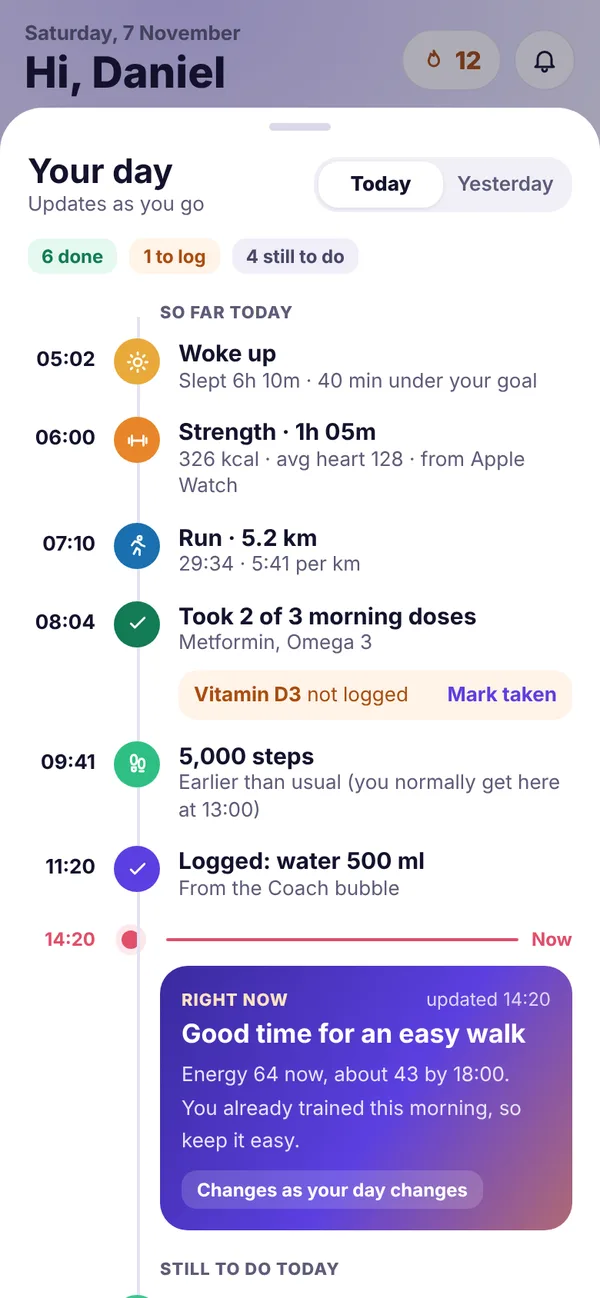
- Your day, as it happens. Your day as one bar from morning to night, with what you have done so far, such as waking up, workouts and doses taken, what is still to come with start and end times, and a "right now" suggestion that changes as your day does.
- All your numbers. Every measure your phone and watch record, VO2 max included, in one list. Pin the ones you care about to Today. A number with nothing coming in says why, with the one step to turn it on.
- Energy and stress through the day. Estimates from your heart rate and heart rate variability while you're still, so you can see what charged you and what drained you. When there isn't enough data for a stress number, crewalong says why instead of guessing. They're estimates, not a measure of mental health.
- Right now. New One suggestion that fits the moment, in a fixed order: a dose that's due, bedtime, recovering after a workout, two minutes of breathing when stress is high while you're still, or a short walk after a long sit. Not now hides it for three hours.
- Your streak, with a rest day. What keeps your streak going today, this week as dots, and one rest day a week that doesn't break it.
- Your ideal day and tonight. Your calmest hours, your best window for a workout, your sleep bank for the week, and the time to be in bed to wake up rested.
- Gentle nudges. A wind-down reminder, a morning summary, and a heads-up when energy is low or a stressful stretch runs long. Each has its own switch, and there are never more than three a day.
- Early signals. When your resting heart rate is up and your heart rate variability is down two mornings running, crewalong suggests taking it easier. It's a hint, not a diagnosis.
Workouts and effort New
Every workout, scored the same fair way.
- Effort points on every workout. Points from your heart rate against your own zones, so an hour of hard badminton and a long easy walk are scored for what they asked of you.
- A page for each workout. Heart rate minute by minute in your zones, points each minute, and how long you spent in each zone, in one scroll.
- Against your best. Compared with your best session of about the same length, with what made the difference, and a tag when you set a new best.
- The morning after. Resting heart rate, heart rate variability and sleep the next morning, so you see how you recovered.
- All your workouts. Every workout from Apple Health or Health Connect by month, with totals, filters and this week on Today.
- Share the effort. Post a workout with an Effort card: points, heart rate in zones and the comparison, each part your choice. Auto-share is off unless you turn it on, and a workout is never posted twice.
My results New
Your lab reports, organised so you can actually read them.
- Just save it, or read it. Save a report as a file, or have its values read now or later. Lists show which reports were read and which are files only.
- Reports read on your phone. Add a blood test as a PDF or photo and crewalong reads the values on your phone. You check them before anything is saved. It picks up the report date, flags a file you have already added, and lets you add lines it didn't recognise.
- A summary in plain words. How many results are in range, what needs a look, and what changed since your last report. It's written from your numbers, not by AI.
- Sorted by body area. Blood count, heart and lipids, sugar, kidney, liver, thyroid, vitamins and more, each showing how many results are out of range. Tap any test to see every reading over the years against its range.
- Timeline and compare. Reports, doctor visits, times you were unwell and medicines in one line. Put two reports side by side and share a one-page PDF with your doctor.
- Read on your phone, AI only if you ask. The text is read on your phone, and the values are stored encrypted. If something looks wrong, you can ask your phone's own AI to read it again. It asks you first every time, runs on your phone, and never sends your report to an online AI. Ranges come from your lab's own report.
All my measures New
Everything your phone and watch track, in one organised place.
- Grouped so it makes sense. Body, activity and recovery, vital signs, and food and water, with today, 7-day and 30-day views and your usual range for each.
- More from your watch. Heart rate variability, breathing rate, blood oxygen and wrist temperature while you sleep, when your watch records them.
- Honest when something is missing. A measure with no data says so, with a way to add it yourself or connect it, instead of being hidden.
- How things connect. Pick two measures and see them together, with patterns in plain words, such as how your heart rate variability changes after a full night's sleep. A pattern needs enough days on both sides, and it's never presented as proof of cause.
Detail pages and weekly reports
Tap any measure to see what made it.
- A page for each measure. Recovery, Sleep, Energy, Stress, heart rate variability, resting heart rate, steps, VO2 max and more, with a ring that marks your usual and tiles for what made today's number.
- Sleep, in detail. Stages through the night, how steady your bedtime is, and hours asleep against what you need.
- A weekly and monthly report. Averages against last week, calendar heatmaps, your energy by hour, and the patterns that stood out.
- What affects you. Quick tags about your day, such as alcohol, late caffeine or a stressful day, compared with days without them, with how many days crewalong used.
Care
Medicines, doctor visits and records, without the admin.
Medicines
Reminders that fit your day.
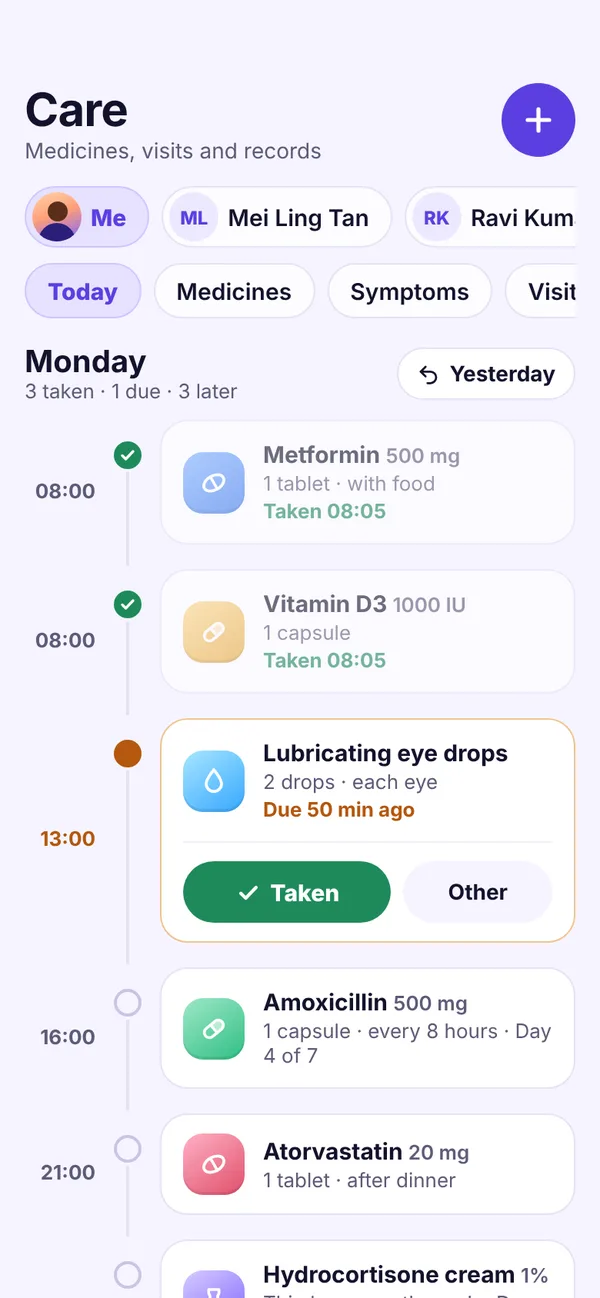
- Read a prescription. New Scan it or add the PDF or photo, and crewalong reads each medicine on your phone: strength, how much, how often, for how long and before or after food. You check every line, then the reminders are set up and courses stop on their last day.
- Or add it your way. Type it, say it, or scan the box. crewalong suggests names of medicines common in Singapore and India.
- Your day of doses. Every dose on one timeline, with what's due now at the top. A dose only counts as missed once its time has passed.
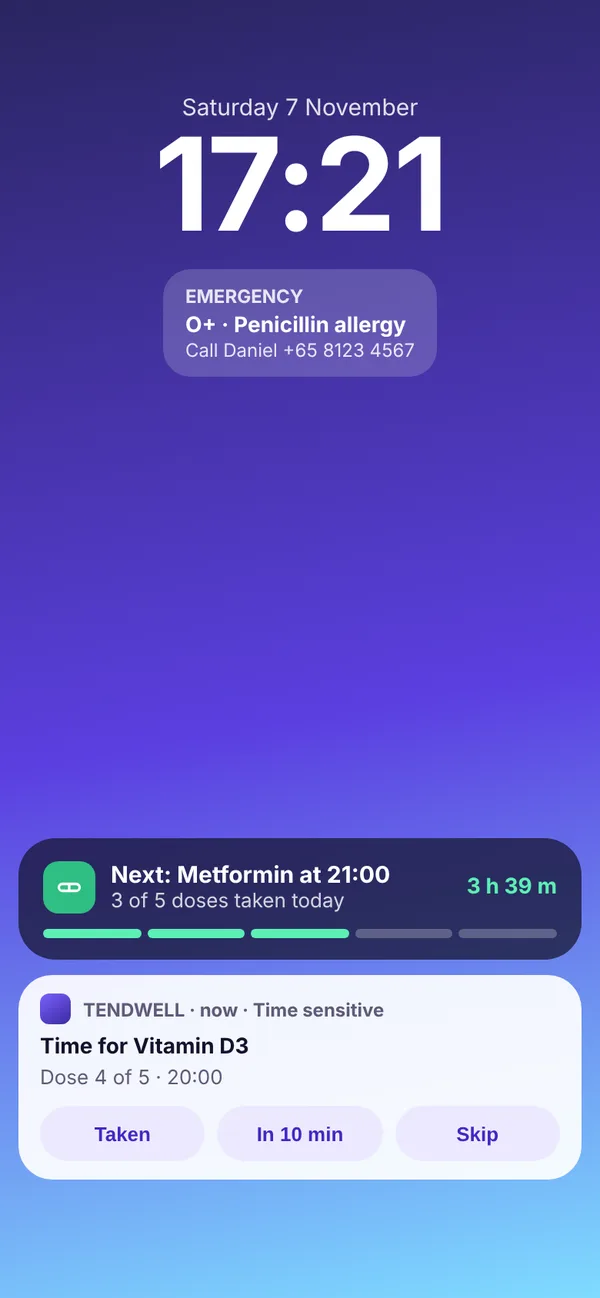
- On your lock screen. Mark a dose as taken, snooze it or skip it without opening the app, and see a live count of today's doses.
- Refills. A nudge before a medicine runs out.
Log
The quickest way to note how you feel.
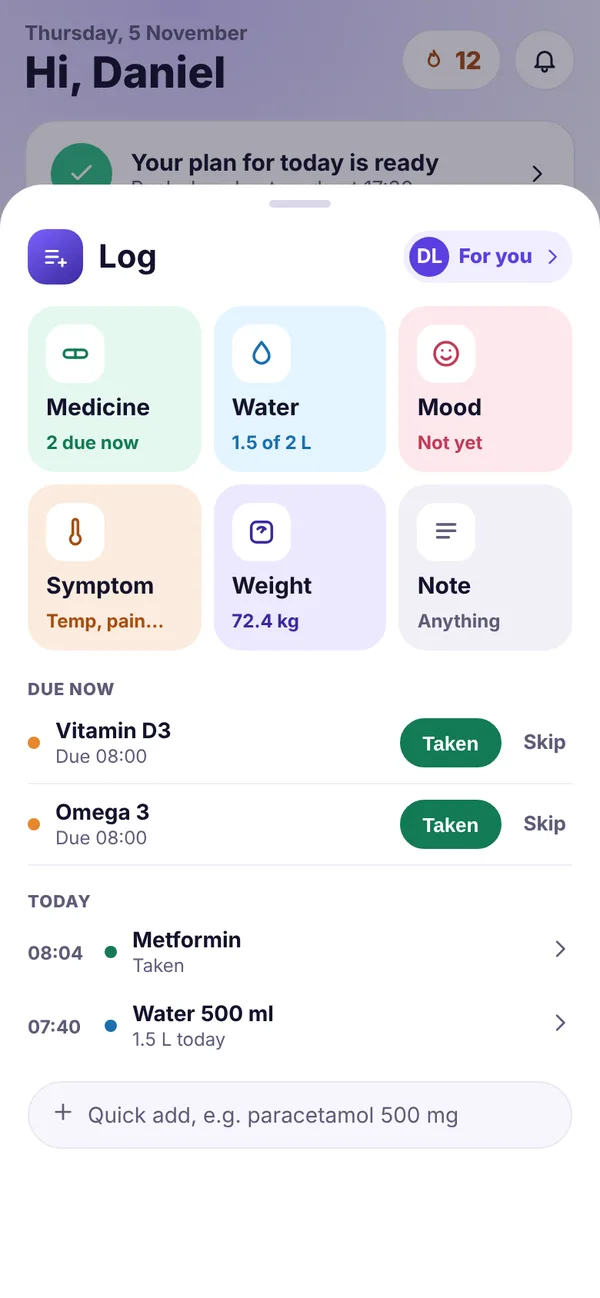
- One tap for the everyday. Water, mood, weight and doses due now, from a small button you can reach from anywhere in the app.
- Or just say what happened. Type something like "fever since evening, 38.4, body ache" and crewalong turns it into symptom and temperature entries. You check every entry before it's saved.
- It logs, it doesn't advise. Log doesn't answer health questions or give medical advice.
Doctor visits New
From the clinic's message to what the doctor said.
- Add it from the message. Paste the clinic's SMS, email or WhatsApp, share it to crewalong, or use a screenshot. The doctor, clinic, time, address and who it's for are read on your phone, and you check them.
- A page for the visit. How soon it is, Directions, WhatsApp and Call, your questions, and what to bring. Reminders the evening before and when it's time to leave.
- Remind the family too. Pick everyone going with you, and each of them gets the same reminders on their own phone, with only the time and place.
- Record the consultation. With your doctor's OK, record the visit, mark the moments you want to find again, and get the words as text on your phone. A short summary, the medicines, tests and next visit are picked out for you to check. The recording stays on your phone and you can delete it any time.
- After the visit. What the doctor said, the reports from that day, new medicines from the prescription, tests ordered, and the next visit with the questions you didn't get to.
- A summary for the doctor. Starts from the visit: about you, why you're here, what changed, medicines in full, results with their ranges and the value before, past visits, and the original reports attached at the end. You choose what goes in.
Conditions New
Each condition with everything that goes with it.
- How it's going. Better, the same, okay or worse, asked once a week, so you and your doctor see the trend.
- What goes with it. The days you felt it each month, and the medicines and visits linked to it.
- In the summary. Conditions show in the doctor summary, and a change for better or worse shows under What changed.
Records and emergencies
Everything a doctor might ask for, ready when you need it.
- What do you need? New Care opens with four ways in: an appointment, a report, a new medicine, or feeling unwell.
- Reports and scans. Keep files in folders, search them, and share a folder with family if you choose.
- Emergency card. Blood group, allergies, conditions, medicines and who to call, filled in from Care. Keep it on your lock screen so it can be seen in an emergency.
- Vaccinations. Follow the Singapore or India schedule for your children, and an adult one for you. Scan a vaccine card or health booklet and crewalong finds each vaccine and its date and ticks it off the schedule.
Cycle tracking
Period, ovulation and fertile window, kept private.
- Predictions that learn. Your period and fertile window, based on your own history. On iPhone for now.
- Shared only if you say so. Cycle data is never shown to followers, and never used for ads or audiences.
About you and your goals
A few details that make your numbers fairer.
- About you. Your birthday, sex, height and weight, filled in from Apple Health or Health Connect or typed by you. They're encrypted and only you can see them.
- Your goals. The sleep you need, the steps you aim for, and up to two things that matter most to you. crewalong puts those first in your insights and nudges.
Family
The health of the people you look after, in one place, whatever phone they use.
Add family the easy way New
Search, send a request, and they choose.
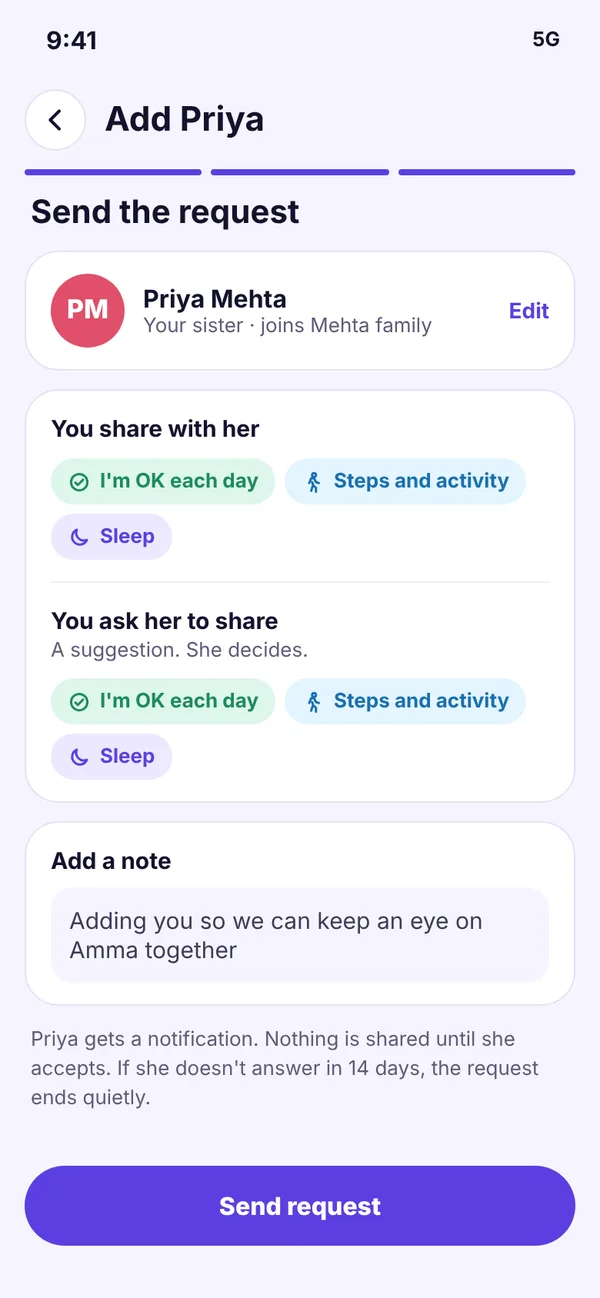
- Find them by name or username. Send a request, say how you're related, and suggest what you'd each share. They see both sides and decide before anything is shared.
- Not on crewalong yet? Send an invite link on WhatsApp or by message. It installs the app and brings them straight to your request.
- Children and parents without a phone. Add them as a profile you look after, such as a child or a parent who doesn't use a smartphone.
- Ask for more. Ask someone to share something extra. They can say yes, no, or change it whenever they like.
How they're really doing
An honest picture, from what each person shares.
- Honest status. All good, Not feeling well (only from what they logged), Worth a look (from their watch, only when two measures are off together or one stays off, and still off today), or No data lately. Each reason names the days, and a measure that's back says "back to usual".
- Good signs read as good. Higher heart rate variability or a lower resting heart rate is shown as a good sign, never a warning.
- Their own usual. Resting heart rate, heart rate variability, breathing rate, blood oxygen, wrist temperature, sleep and steps, each against that person's usual range, with a trend for each.
- Not feeling well. Symptoms, temperatures and missed doses from the last week, if they share their health log and medicines.
- Always up to date about being out of date. Every person shows when their data last arrived and from which device, so a quiet morning isn't mistaken for a bad day.
- Family pulse. How everyone is doing in one ring, scored early in the day on last night's sleep and yesterday's steps, so it isn't low just because it's early.
Looking out for each other
Help that arrives at the right moment.
- Check in or cheer. Send a check-in and it opens straight to "Are you okay?" on their phone, with I'm OK and Call me. Or just send a cheer.
- Family calendar. New Everyone's appointments in one month, a colour per person, with what's coming up right on the Family tab. Choose whose and what to show, and keep automatic vaccine reminders to the next 30 days.
- Daily I'm OK. A one-tap check each day for someone who lives alone, if they turn it on.
- Missed-dose alerts. With their permission, you get a heads-up if they miss a medicine.
- Add to each other's Care. New Add a report, a visit or a medicine for an adult in your family. It goes into their Care with your name on it, they're told, and you only see what you added. They can stop it any time.
- Emergency access. New If something happens, family can open someone's records, read only, for 24 hours. The person is told at once, every opening is logged, and they choose who can, or nobody.
- Share your day with family. Send your day card to the family instead of everyone.
Socials
The friends who keep you going, on your terms.
Feed and profile
Like the apps you know, but private by default.
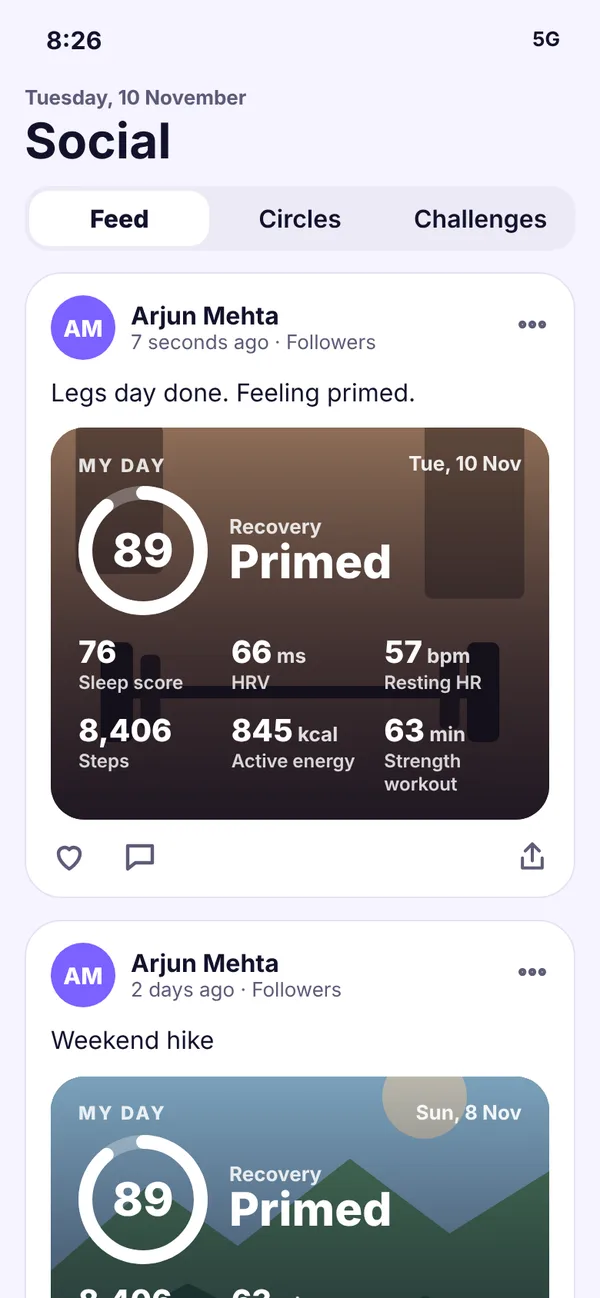
- Share your day. Pick which numbers to show, such as recovery, sleep, steps or a workout, add a caption, and choose a background theme or your own photo.
- Workouts, photos and maps. Post a run or a gym session with up to 10 photos and the route map. Maps always leave out the first and last 300 metres.
- Your profile. A profile photo, a cover and your city, with your recent posts.
- Stories. New A photo or your day that disappears after 24 hours, with who saw it visible only to you. Children's stories are for family only.
- Workouts that look good. A shared workout gets its own artwork for the sport, with your effort points large, from running and swimming to badminton, tennis and pickleball. You choose which numbers show.
- Cheers and comments. Reply to a comment in a thread, mention someone with @ (only people who can already see the post), and the feed ends with "You're all caught up", so it never asks for more of your time.
- Notifications that make sense. New What needs you stays on top until it's done, cheers on one post are grouped, and you can mute a person for a week or turn off a kind. Family and Care alerts are never muted by accident.
- Founding members. The first 100 people get a founding member badge, which they can hide.
- Find your people. Search by name or username, or share one link for your profile, your family, a circle, a challenge or an event. The link shows who invited you and to what, and nothing about anyone's health.
Circles Updated
Small groups with their own space.
- A look of its own. Each circle has a photo, a cover, what it's about, where it meets and its activity. Invites shared on WhatsApp show the circle's cover.
- Public or invite only. Anyone can find and join a public circle, but only members see its posts. Private circles are invite only. Public circles are for adults.
- Find a circle. Running clubs, office step groups or yoga crews near you.
- Events. Set a run or a game with a place and time, people say they're going, and a waitlist moves up when someone drops out.
- Add people already on crewalong. Invite them in the app and they tap Join. No code needed.
- Circle pulse. How the group is moving this week, from totals only, never one person's numbers. You choose whether to be counted.
Fair challenges
Friendly competition where effort wins.
- Scored on effort, not calories. Effort is measured against your own heart rate, so a bigger or fitter person doesn't win by default.
- Head to head, in a group, or as a team. Effort, improvement, steps or distance, over the days you pick. Inside a circle, set a team target, like 300 km together in a month.
- Fair for newcomers. Comparisons use the last 30 days, so someone who joined last week isn't behind from the start.
- Only scores are shared. Leaderboards show challenge points, never the health readings behind them.
- Know what you joined. Every challenge shows whether it's official, sponsored, public or invite only.
Privacy on every post
Show the run, not where you live.
- Every post asks who sees it. Followers, a circle, family, or only you. Heart rate stays off a post unless you add it.
- Photos are cleaned first. Location and camera details are removed on your phone before upload, and photos are checked before others see them.
Everywhere in the app
Small things that make it easier to use.
One search
Search from any tab for something to do, your records, family and people.
Your first week
See your own last 30 days as soon as you connect, then three small steps for the first week. How this works shows each tab again whenever you want.
Liquid Glass on iPhone
Built for the newest iPhone look, and frosted on older phones and Android.
Coming next
Planned, not in the app yet. We'll update this page as things arrive.
Record workouts
Start a run, ride or gym session from your phone or watch, with live heart rate zones and a map.
Coaches
Invite a coach and choose exactly which of your data they can see, the same way family sharing works.
More apps and devices
Direct connections to more fitness services, so you see everything in one place even without Apple Health.
General wellness information from your own data, not medical advice. crewalong's scores, estimates and patterns can be wrong, and a pattern is not proof of cause. crewalong doesn't diagnose anything. Lab ranges come from your lab's report. If something worries you, talk to a doctor.
Be one of our first 100
Founding members get every premium feature free for a year once paid plans launch.